If you’ve ever stood in a metal fabrication shop watching a shearing machine slice through thick steel plate or thin aluminum sheet with precision, you might’ve glanced at its control panel and thought, “That’s just a bunch of buttons and dials.” I’ve been a shearing machine supplier for 12 years, and I’ve heard that exact line from new shop owners and veteran fabricators alike—until they’ve had a part fail because someone “winged” the shearing process instead of using the control panel. Today, I want to break down exactly what that control panel does, because it’s not just a command center—it’s the backbone of consistent, safe, and efficient shearing operations. Shearing Machine

Let’s start with the basics: a shearing machine’s whole job is to cut sheet or plate metal along a straight line, using a upper blade moving down past a fixed lower blade, creating a clean, slitted edge without twisting or tearing the material. Blunt blades or misaligned gaps between blades ruin cuts, but even sharp blades will underperform if the machine’s settings are off. That’s where the control panel steps in to turn raw power and moving parts into a repeatable, controlled process.
First, and most critical, is the machine’s alignment and gap adjustment. Think of shearing blades like a pair of scissors: if the gap between the two blades is too wide, the metal will deform instead of cut; too narrow, and the blades will grind, chip, or even break over time. Old-school machines relied on manual hand cranks and spirit levels to tweak that gap—taking 10 to 15 minutes per setup, and often leading to slight inconsistencies between cuts. Modern control panels automate that. On our mid-range hydraulic shearing machines, the control panel has a dedicated gap calibration function that lets you input the material thickness and grade (aluminum, mild steel, stainless steel, etc.), and it adjusts the blade gap automatically in 0.01mm increments. I had a customer in Chicago a few years back who was producing custom gutters before switching to our machines. He told me his old manual machine took him two hours to set up for a 100-part run of 0.8mm aluminum; with our control panel, he cuts that setup time to 10 minutes, and the scrap rate dropped from 8% to less than 1%. That’s not a small win—that’s thousands of dollars saved every month.
Next up is stroke control and blade positioning. The upper blade’s downward stroke has to be calibrated perfectly for material thickness: thin sheet needs a short, fast stroke to avoid bending the material, while thick plate needs a slower, deeper stroke to generate enough pressure to shear through. Again, manual machines required adjusting a clutch or mechanical stop with a wrench, which was imprecise and led to wasted material. The control panel lets you set exact stroke lengths and speeds with a few taps on a touchscreen. For high-volume runs, operators can save custom presets: one for 2mm mild steel, another for 6mm stainless, a third for 0.5mm copper foil. That means if you switch between jobs, you don’t have to re-calibrate from scratch—just pull up the preset, and you’re good to go. I remember a fabricator in Detroit who does work for automotive part manufacturers, where every cut has to be within 0.2mm of the spec. He told me before he used our machines, he’d have an operator checking every 10th cut with a caliper, just to make sure the stroke was on point. Now, the control panel logs every stroke’s position, so he can pull a full run’s data in 10 seconds, no manual checks needed.
Safety is another huge role the control panel plays, and it’s one that new operators (even experienced ones) often overlook. Shearing machines are powerful—an unguarded upper blade can cause a severe injury in a split second, and many of those accidents happen when an operator is adjusting settings mid-cycle. The control panel is the only “gatekeeper” between the operator and dangerous moving parts. For example, most modern control panels have a two-hand activation feature: both hands have to be on separate buttons on the panel to start the cut, so the operator can’t accidentally reach over the blade. There’s also a light curtain interlock function: if an obstruction (like a hand, or a misaligned piece of metal) breaks the light beam near the blade area, the control panel immediately stops the stroke, no need for a emergency stop button. Even something as simple as the control panel’s emergency stop— a big, red button that cuts all power to the machine in 0.1 seconds— is a feature that’s standardized on every control panel we ship. A few years back, we had a customer in Cleveland who was running a old, manual shearing machine. His operator’s glove got caught in the blade during a setup. He pulled the emergency cord, but by the time the machine stopped, the glove was torn and the operator’s hand was injured. After switching to our machine with the control panel’s two-hand activation and instant E-stop, he told me he no longer worries about that kind of accident— and his insurance premium dropped 15% within a year, which is a huge bonus for small businesses.
Wait, I should also talk about process logging and data tracking, because that’s becoming more important as shops look for ways to optimize their operations, especially with Industry 4.0. A lot of people don’t realize that modern control panels can connect to your shop’s Wi-Fi, logging every cut: material type, thickness, stroke length, number of parts cut, and even blade wear over time. That data isn’t just for quality control— it’s for planning. If you notice that your 2mm mild steel blades are starting to show wear after 500 cuts, you can schedule a blade change before they start causing scrap, instead of waiting for a bad cut to ruin a whole job. We had a customer in Toronto who runs a 10-person shop doing custom metal signage. Before he used our control panel’s logging feature, he was changing blades once every two weeks, whether they needed it or not. Now, he checks the weekly blade wear data, and he only changes blades when they hit 1,000 cuts for 2mm material, saving him $2,000 a year in blade replacements and lost production time.
I want to be honest here: not all control panels are created equal. When I started selling shearing machines, we used a basic, button-only control panel that was cheap, but it had a lot of limitations. Operators had to memorize 20 different button functions, and if a setting was off, you didn’t get an error message— you just got a bad cut. Now, we use touchscreen control panels that have intuitive menus, pop-up error messages (like “Blade gap too large for material thickness”), and even built-in tutorials for new operators. I’ve had a shop owner tell me he hired a new operator with zero shearing experience, and that operator was running full production on 10mm plate within three days— something that would’ve taken two weeks with the old button-panel machines. That’s the biggest value of a good control panel: it lowers the skill barrier for operators, while also giving experienced users the precision they need.
Of course, there’s a common myth out there that “more buttons = more complicated.” I get that— I’ve seen control panels with 50 different buttons that make even veteran fabricators sigh. But a well-designed control panel is about simplicity, not complexity. The touchscreen panels we use have a home screen that only shows the most-used functions: stroke count, current preset, emergency stop. All the advanced settings (gap calibration, stroke speed, data logging) are tucked into secondary menus, so new operators don’t get overwhelmed, but seasoned users can access what they need quickly.
Let’s circle back to that original question: what is the role of the control panel in a shearing machine? It’s not just a place to press “start.” It’s a precision calibration tool that cuts setup time and scrap, a safety barrier that protects operators from injury, a data hub that helps shops plan and reduce costs, and a training tool that lets shops bring on new team members faster. I’ve seen shops go from 100 parts a day to 500 parts a day, just by upgrading their control panels, without buying a whole new machine.
If you’re running a metal fabrication shop, you know how much downtime and scrap cost you. If your shearing machine’s control panel is outdated, or if you’re still using a manual setup, it’s worth taking a closer look at how a modern control panel can change your operations. Whether you’re a small custom shop looking to reduce scrap, or a high-volume production facility needing consistent, repeatable cuts, a good control panel is the unsung hero of your shearing operation.
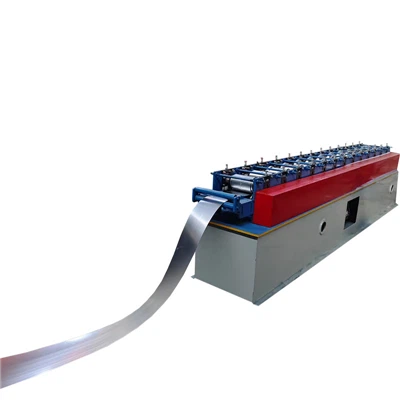
If you’d like to learn more about how our shearing machine control panels can work for your specific operations, feel free to reach out to our sales team to discuss your requirements and find the right solution for your shop.
Metal Sheet Roll Cold Rolling Forming Equipment References
- American Society of Mechanical Engineers. (2019). Safety Standards for Metal Forming and Shearing Machinery. ASME B11.1-2019.
- Fabricators & Manufacturers Association International. (2021). Optimizing Shear Operations for Small to Medium Fabrication Shops. FMA Technical Report Series.
- International Organization for Standardization. (2020). Machine Safety – Control Systems for Shearing Machines. ISO 16092-3:2020.
- The Fabricator Magazine. (2022). “The Hidden Cost of Outdated Machine Control Panels.” Industry Trends Report.
- Society of Manufacturing Engineers. (2021). Industry 4.0 Applications for Metal Cutting Operations. SME Press.
Wuxi Yuanding Machinery Manufacturing Co., Ltd.
We’re well-known as one of the leading shearing machine manufacturers and suppliers in China, also support customized service. Please feel free to buy advanced shearing machine made in China here from our factory. For pricelist, contact us now.
Address: Yaguang Industrial Park, No. 88 Chaoyang South Road, Xishan District, Wuxi City, Jiangsu Province
E-mail: 13861798466@163.com
WebSite: https://www.wxyuanding.com/
